DMA 30 · Materials
Simple shader nodes
Connect a shader and see how roughness changes a reflection under a fixed light.
Analog. Sketch the highlight on a glazed mug and a chalky mug. Which one has a small, sharp reflection?
Read a wire
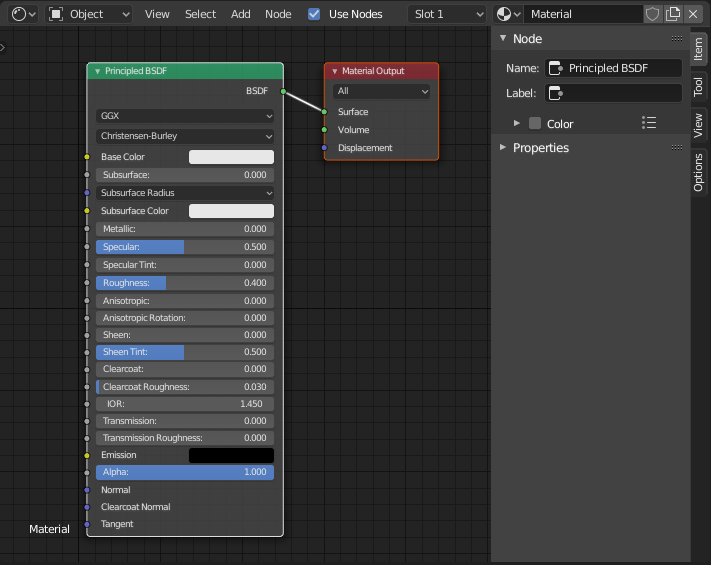
A shader node does one job. Its sockets are the points where wires connect. The Principled BSDF node describes how a surface reacts to light. Connect its BSDF output to Surface on Material Output to use that shader.
Keep the light fixed and change roughness
- Disconnect the Surface wire, then reconnect it.
- Switch between Glossy and Matte under the same light. Which reflection spreads out more?
- For a second test, open Add a texture and connect Fac to Roughness. What takes over from the slider?
Repeat it in Blender
- Select a mesh and open the Shading workspace. In the Shader Editor, click New if the mesh needs a material. Switch the viewport to Material Preview.
- Check that the BSDF output connects to Surface, then change Roughness.
- To vary roughness across the surface, add Noise Texture in the Shader Editor. Connect its gray Fac output to Roughness on Principled BSDF.
Material missing? Check the assigned material slot, the Surface wire, and the viewport shading mode.
Blender manual · Principled BSDF
Optional · Set roughness with Blender Python
Select a mesh with its own Principled BSDF material. In Blender’s Scripting workspace, create a new text block, paste the code, and choose Run Script. Try 0.2 and 0.8 under the same light.
Blender Python API overview · Optional Python recipes for lighting and cameras
 View full size
History · Why surface roughness changes a highlight
In 1982, Robert Cook and Kenneth Torrance published a reflection model that accounted for a surface’s tiny facets. A rougher surface spreads the reflected light over more directions, which usually gives a broader highlight. Keep the light fixed in the lab and compare a low and a high Roughness setting. Cook and Torrance · A Reflectance Model for Computer Graphics (PDF)
Wire a surface
Illustrated preview under a fixed studio light
Principled BSDF
Lower values give sharper reflections.
Output BSDF · the surface shader
Material Output
Input Surface · the shader used by the material
Add a texture
Noise Texture
Output Fac · a number from 0 to 1 that varies across the surface
Read what the material controls change
When BSDF is disconnected from Surface, the material preview loses the shader. With it connected, low roughness gives a small, sharp highlight and high roughness spreads the highlight out. Connecting Noise Texture to Roughness makes sharp and soft highlights vary across the surface.
Rough. Try one material change in Blender. Finalize. Keep it if the highlight helps the shape read in your shot.